color palette
#031527
#ffffff
#eb0000
preview
readme
Spark Omarchy
A corporate theme for Omarchy built on the SparkFabrik design system: Spark red on a deep navy background, with the full brand palette mapped onto the terminal and desktop.
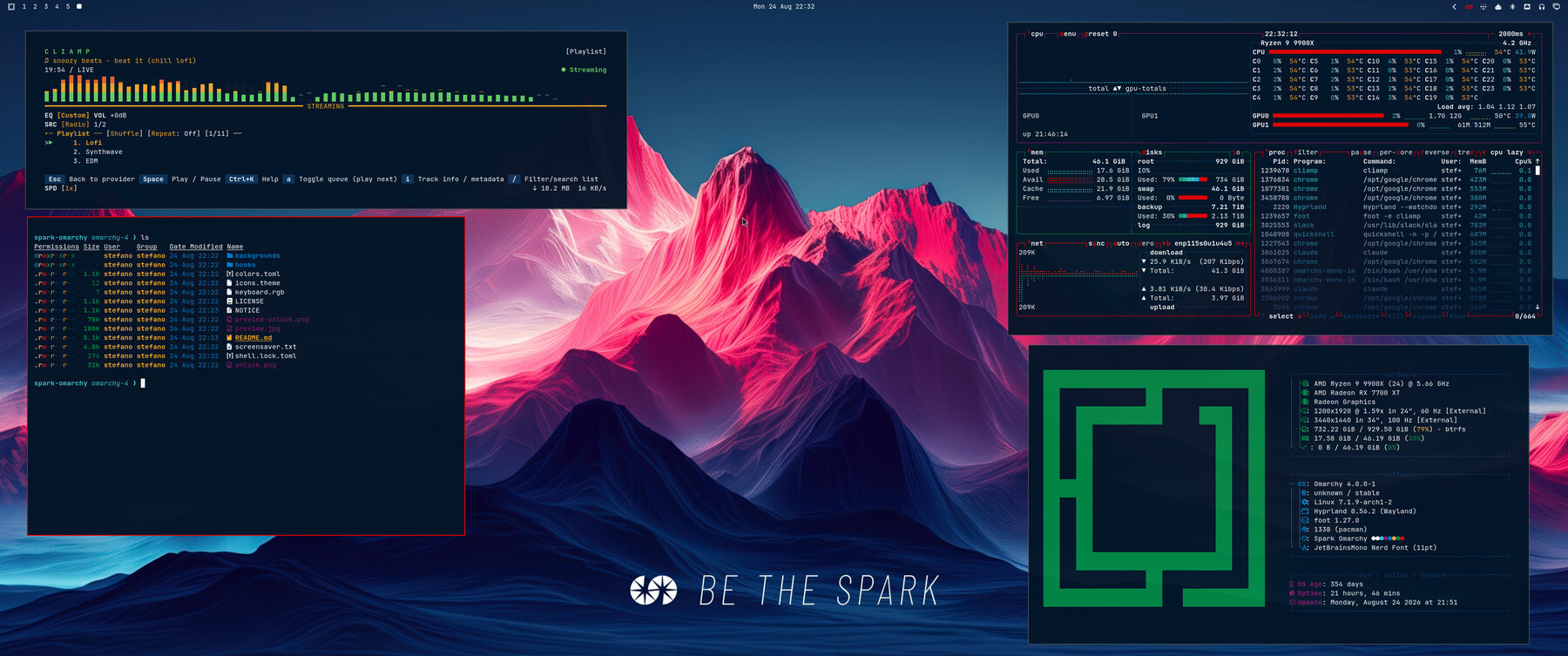
Requires Omarchy 4. Everything the theme colors is derived from colors.toml, so the terminal, the shell (bar, notifications, launcher, lock screen), Neovim, VS Code, btop, Hyprland borders and the rest follow the same palette without any per-app files.
Install
omarchy theme install https://github.com/stefanomainardi/spark-omarchyThat clones the repo into ~/.config/omarchy/themes/spark-omarchy and applies it. To switch later, use omarchy theme set spark-omarchy or pick it from the theme menu.
To update:
omarchy theme updateBoot and unlock screen
The theme ships its own Plymouth logo (unlock.png, the SparkFabrik wordmark). Apply it with:
omarchy plymouth set-by-theme spark-omarchyThe theme also appears in the unlock screen picker (omarchy plymouth switcher).
Screensaver
The theme carries the SparkFabrik logo as screensaver art in screensaver.txt. Omarchy reads its screensaver art from a single global file, so a small theme-set hook is included to keep the art tied to the active theme: activate Spark and you get the Spark logo, switch away and the stock Omarchy logo comes back.
Install the hook once:
mkdir -p ~/.config/omarchy/hooks/theme-set.d
cp ~/.config/omarchy/themes/spark-omarchy/hooks/theme-set.d/screensaver-branding \
   ~/.config/omarchy/hooks/theme-set.d/
omarchy theme set spark-omarchy
Test it with omarchy-launch-screensaver force (press any key to dismiss).
Without the hook the theme still works, the screensaver simply keeps whatever art is already set. If you would rather not use a hook, set the logo once by hand with omarchy branding screensaver image.
Backgrounds
Nine wallpapers, cycled with omarchy theme bg next or picked from the background switcher.
| File | Description |
|---|---|
1-spark-corporate.jpg | Red and blue corporate design (default) |
2-spark-mountains.jpg | Mountain landscape in Spark colors |
3-spark-abstract.jpg | Abstract shapes in brand colors |
4-spark-gradient.jpg | Clean brand gradient |
5-spark-mountains-a.jpg | Mountains A, split peak with a bright core |
6-spark-mountains-b.jpg | Mountains B, red and blue burst |
7-spark-mountains-c.jpg | Mountains C, peak under a blue nebula |
8-spark-mountains-d.jpg | Mountains D, soft red and blue split |
9-spark-mountains-e.jpg | Mountains E, mountain range under a red and blue sky |
All of them are 3360x1440, framed for ultrawide displays. Extra wallpapers of your own can go in ~/.config/omarchy/backgrounds/spark-omarchy/; they join the same cycle without touching the theme.
Palette
Primary
| Purpose | Hex | Name |
|---|---|---|
| Spark Red | #eb0000 | Primary brand |
| Spark Blue | #0c335a | Secondary brand |
| Spark Black | #031527 | Background |
| Spark White | #ffffff | Text |
Secondary
| Role | Hex | Used for |
|---|---|---|
| Light Blue | #027aca | Links and highlights |
| Aquamarine | #40c6cf | Info |
| Orange | #f36931 | Warnings |
| Yellow | #f7ad2c | Attention |
| Dark Green | #008844 | Success |
| Lime | #68d366 | Success accents |
| Dark Purple | #8d1971 | Special elements |
| Purple | #cd0089 | Highlights |
What is in here
| File | Role |
|---|---|
colors.toml | The palette. Every generated app config comes from this file |
shell.lock.toml | Lock screen colors, overriding the [lock] section of the generated shell config |
icons.theme | GTK icon theme name |
keyboard.rgb | Backlight color for supported keyboards |
preview.jpg | Thumbnail in the theme switcher |
unlock.png | Logo for the Plymouth boot screen |
preview-unlock.png | Thumbnail in the unlock screen picker |
screensaver.txt | Screensaver art |
backgrounds/ | Wallpapers |
hooks/theme-set.d/ | Optional hook that scopes the screensaver art to the active theme |
To change a color, edit colors.toml and run omarchy theme set spark-omarchy. Do not add per-app config files unless you mean to override a generated one: a file shipped by the theme always wins over the generated version.
Keep comments in colors.toml on their own line. Not every consumer parses TOML properly: Omawrite, the editor Omarchy ships, reads the file line by line and does not strip a trailing comment, so foreground = "#ffffff" # white leaves it with an unusable value and the editor renders invisible text on a transparent window.
Contributing
Issues and pull requests are welcome. If you change a color, please say which brand color it comes from.
Credits
Theme by Stefano Mainardi, built on the SparkFabrik design system for Omarchy Linux. The theme started as a color substitution over Catppuccin for Omarchy and has since been rebuilt around the Omarchy 4 palette schema.
License
The theme code and configuration are MIT licensed, see LICENSE.
The SparkFabrik name, logo and wallpapers are property of SparkFabrik S.r.l. and are included here with permission. They are not covered by the MIT license and may not be reused to identify another product or organization. See NOTICE.