color palette
background
#1a1a1a
foreground
#e5d6c6
accent
#6c5b4c
cursor
#ff884d
selection background
#ffbb99
selection foreground
#1a1a1a
color0
#1a1a1a
color1
#d45d4c
color2
#9e8f70
color3
#d9a066
color4
#6c5b4c
color5
#b57276
color6
#a98274
color7
#d1c0b0
color8
#2a2a2a
color9
#e87461
color10
#b39c7c
color11
#e3b97f
color12
#7f6b5d
color13
#c6898c
color14
#ba9486
color15
#f2e6d8
preview
~/ember-n-ash
┌──────────────────────Hardware──────────────────────┐
PC: omarchy-host
│ ├: x86_64 (8 cores) @ 4.00 GHz
│ ├: Integrated Graphics
│ ├: 1920x1080 @ 60 Hz
│ ├: 120 / 500 GiB (24%)
│ ├: 8 / 16 GiB (50%)
└ └ : 0 / 4 GiB (0%)
└────────────────────────────────────────────────────┘
┌──────────────────────Software──────────────────────┐
OS: Omarchy 3.6.0
│ ├: master
│ ├: stable
│ ├: linux-arch
│ ├: Hyprland (Wayland)
│ ├: alacritty
│ ├: 1024 (pacman)
│ ├: Ember n Ash ●●●●●●●●
└ └: JetBrainsMono Nerd Font (9pt)
└────────────────────────────────────────────────────┘
┌─────────────────Age / Uptime / Update───────────────┐
OS Age: 0 days
Uptime: 2 hours, 13 mins
Update: Today
└────────────────────────────────────────────────────┘
user@omarchy:~ $
readme
Ember n Ash Theme
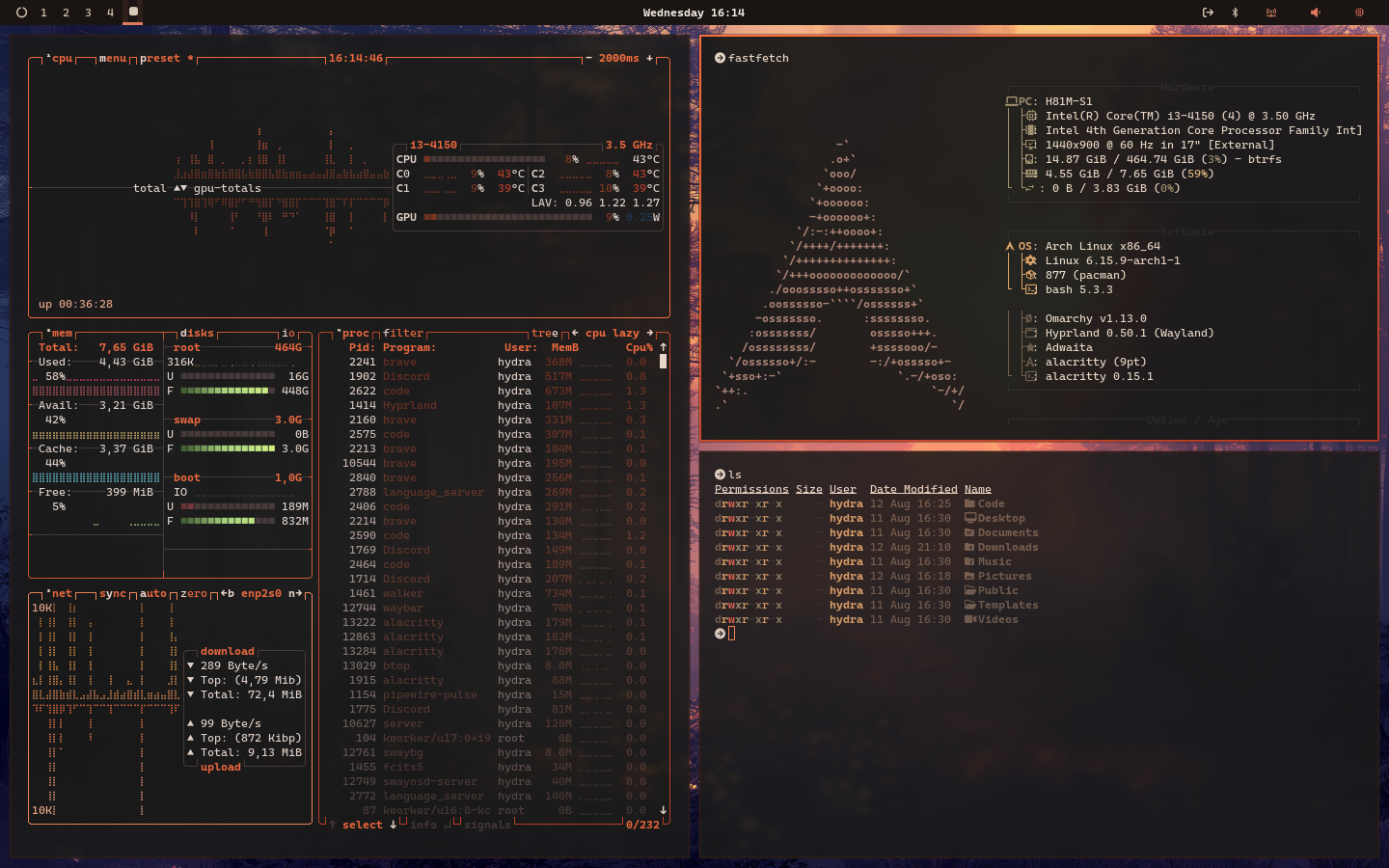
A warm, smoky aesthetic — deep charcoals and ashy grays kissed with soft ember light. Designed for those who want their desktop to feel like glowing coals in a fading hearth.
Design Notes
- Subtle warmth: Low-saturation ember tones that never overpower
- Smoky depth: Dark grays with just a hint of brown for richness
- Eyes at ease: Muted contrast for long sessions without strain
- One vision, everywhere: Consistent palette across terminal, bar, lock screen, and notifications
Color DNA
Core Shades
| Purpose | Hex | Name |
|---|---|---|
| Background | #1a1a1a | Deep Ash Charcoal |
| Foreground | #e5d6c6 | Warm Ash Beige |
| Secondary | #2a2a2a | Smoked Iron |
Accents
| Role | Hex | Description |
|---|---|---|
| Primary | #ff884d | Soft Ember Orange |
| Secondary | #d9a066 | Ashy Gold |
| Success | #9e8f70 | Muted Moss |
| Warning | #e3b97f | Burnished Amber |
| Error | #d45d4c | Smoldering Coal |
| Info | #a98274 | Dusty Clay |
Terminal Palette
| Color | Normal | Bright |
|---|---|---|
| Black | #1a1a1a | #2a2a2a |
| Red | #d45d4c | #e87461 |
| Green | #9e8f70 | #b39c7c |
| Yellow | #d9a066 | #e3b97f |
| Blue | #6c5b4c | #7f6b5d |
| Magenta | #b57276 | #c6898c |
| Cyan | #a98274 | #ba9486 |
| White | #d1c0b0 | #f2e6d8 |
What’s Themed
- Alacritty — smoky charcoal backdrop with warm ember accents
- Hyprland — ember gradient active borders
- Waybar — subtle warm indicators with gentle glow
- Mako — amber borders on notifications
- Btop — soft ember gradients that mimic fading coals
- Neovim — syntax colors tuned for a warm, muted vibe
- Hyprlock — dim charcoal lock screen with ember glow accents
Install
To install this theme, use the omarchy-theme-install command:
omarchy-theme-install https://github.com/Hydradevx/omarchy-ember-n-ash-themeWallpaper Ideas
- Minimalist dark gray with orange ember accents
- Photography of campfires or glowing charcoal
- Smoky mountains at dusk with warm light
- Abstract renders of fading coals
Tip: Works beautifully with a slight vignette and low-opacity blur for a soft, ember-lit atmosphere.