color palette
#0a0a0f
#e0f7ff
#00FFFF
#00FFFF
#00FFFF
#0a0a0f
#1a1a24
#ff2a6d
#39ff14
#ffd700
#00FFFF
#ff00ff
#00CCCC
#c0c5ce
#4a4a5c
#ff5c8d
#5fff44
#ffe44d
#66FFFF
#ff66ff
#33dddd
#ffffff
preview
readme
Cyberpunk Cyan Theme for Omarchy
A cyberpunk-inspired dark theme with vibrant cyan neon accents for Omarchy Linux.
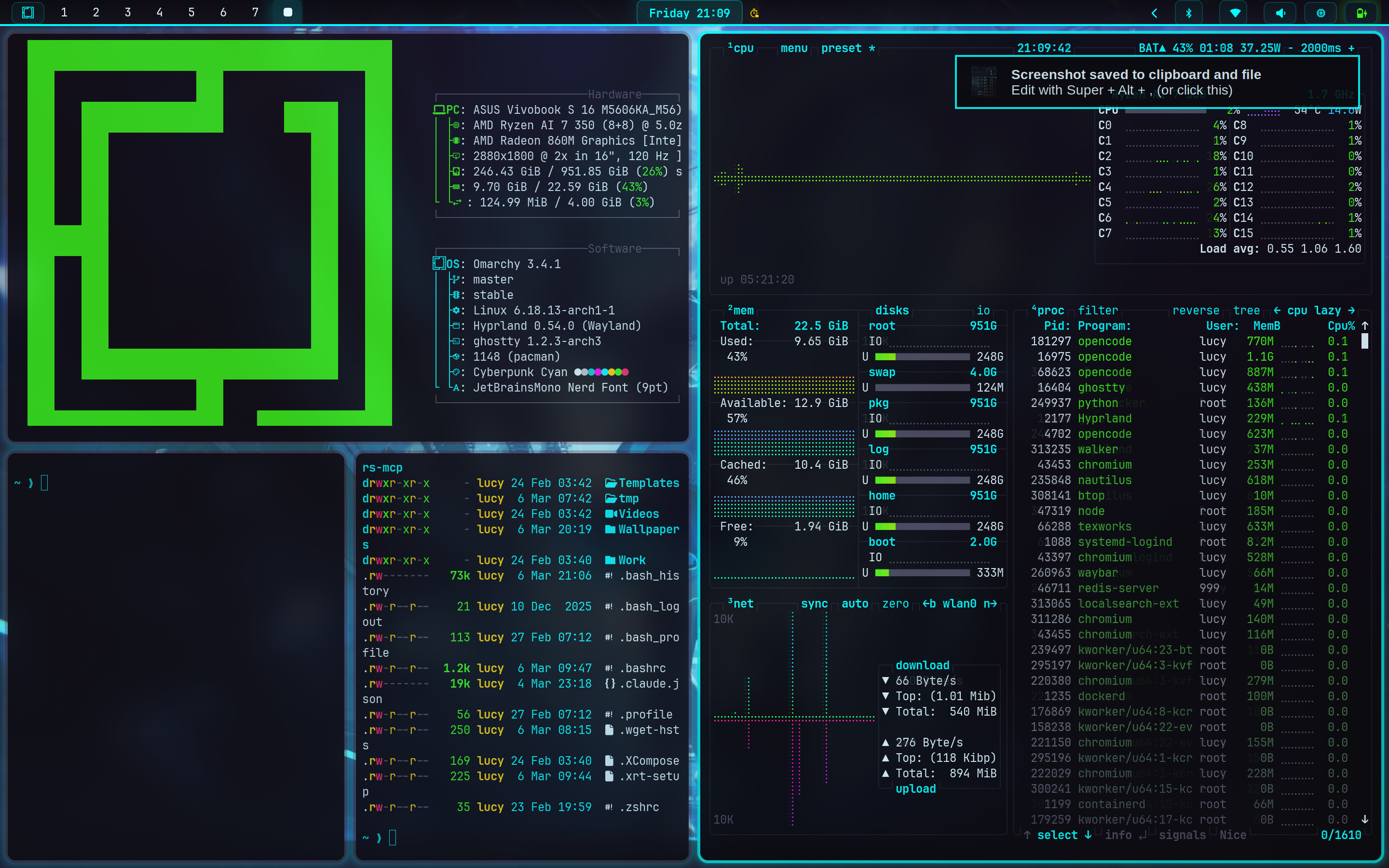
Colors
| Color | Hex | Usage |
|---|---|---|
| Background | #0a0a0f | Main background |
| Foreground | #e0f7ff | Primary text |
| Accent (Cyan) | #00FFFF | Borders, highlights, active elements |
| Cyan Dim | #00CCCC | Secondary accents |
| Pink | #ff2a6d | Errors, urgent notifications |
| Green | #39ff14 | Success, low urgency |
| Purple | #ff00ff | Special highlights |
| Yellow | #ffd700 | Warnings, attention |
Installation
# Clone the repository
git clone https://github.com/matcraft94/cyberpunk-cyan.git

# Copy to Omarchy themes directory
cp -r cyberpunk-cyan ~/.config/omarchy/themes/

# Apply the theme
omarchy-theme-set cyberpunk-cyan
Recommended Ghostty Settings
For the best cyberpunk experience, add to your ~/.config/ghostty/config:
# Font
font-family = "JetBrainsMono Nerd Font"
font-style = Regular
font-size = 9

# Window
window-theme = ghostty
window-padding-x = 14
window-padding-y = 14

# Cursor
cursor-style = "block"
cursor-style-blink = false

# Transparency effect (blur provided by Hyprland compositor)
background-opacity = 0.85

# Performance fix for Hyprland
async-backend = epoll

# Slowdown mouse scrolling
mouse-scroll-multiplier = 0.95
Customization:
- Opacity:
0.80-0.90(lower = more transparent) - Font size:
8-11(depending on screen size) - Padding:
10-16(window spacing)
Features
- Transparency & blur effects - Recommended Ghostty opacity: 0.85 for cyberpunk glass effect
- Glassmorphism effects in Walker app launcher with cyan glow
- Neon glow on Waybar elements
- 3-level urgency notifications in Mako (green/cyan/pink)
- Terminal themes for Alacritty, Kitty, and Ghostty
- Obsidian theme included for note-taking
- 11 unique cyberpunk wallpapers in various resolutions (1080p to 5K)
- Hyprlock screen lock theme
- SwayOSD on-screen display styling
- Optional glitch screensaver - WebKit2GTK-based cyberpunk glitch effect with the OMARCHY ASCII art, cyan/magenta chromatic aberration, and CRT scanlines (cursor stays visible)
Cyberpunk Glitch Screensaver (Optional)
An animated glitch screensaver inspired by Jhey Tompkins' CodePen is included as an optional add-on. It replaces the default tte-based Omarchy screensaver with a lightweight WebKit2GTK window that renders the OMARCHY ASCII art with cyberpunk-style chromatic aberration, scanlines, and random glitch bursts.
Requirements:
python-gobjectandwebkit2gtk-4.1installed (standard on most Arch/GTK systems)
Install:
cd ~/.config/omarchy/themes/cyberpunk-cyan/screensaver
./install.sh
Uninstall / Restore original:
cd ~/.config/omarchy/themes/cyberpunk-cyan/screensaver
./uninstall.sh
Test it immediately:
omarchy-launch-screensaver forceThe screensaver closes automatically on any key press or mouse movement, and does not hide the mouse cursor.
Wallpapers
The theme includes 11 unique carefully selected cyberpunk-themed wallpapers:
Default: 1369816.png - Cyberpunk street scene (4K)
| Wallpaper | Resolution | Description |
|---|---|---|
1369816.png ⭐ | 4K | Default - Cyberpunk street scene |
149972.jpg | HD | Cyberpunk landscape |
426401.jpg | 1080p | Minimal cyberpunk design |
693509.png | 2560x1572 | Neon-lit city street |
821174.jpg | 1920x1080 | Abstract cyberpunk artwork |
cyberpunk-2077-5th-3840x2160-24843.jpg | 3840x2160 | Cyberpunk 2077 5th anniversary |
cyberpunk-2077-female-v-2020-games-xbox-series-x-3840x2160-540.jpg | 3840x2160 | Female V character art |
cyberpunk-v-gameplay-3840x2160.jpg | 3840x2160 | Female V gameplay scene |
hatsune-miku-3840x2160.jpg | 3840x2160 | Hatsune Miku cyberpunk style |
hatsune-miku-radiant-5120x3066.jpg | 5120x3066 | Hatsune Miku radiant 5K |
matrix-digital-rain-6500x3520.jpg | 6500x3520 | Matrix digital rain cyan |
Note: Wallpapers are a compilation found from free sources online.
File Structure
cyberpunk-cyan/
├── backgrounds/          # 11 unique wallpapers
├── colors.toml          # Base color palette
├── waybar.css           # Waybar color variables
├── btop.theme           # System monitor theme
├── neovim.lua           # Neovim color configuration
├── vscode.json          # VS Code color customizations
├── icons.theme          # Icon theme reference
├── mako.ini             # Notification daemon theme
├── walker.css           # App launcher styling
├── hyprlock.conf        # Screen lock colors
├── hyprland.conf        # Window manager borders
├── alacritty.toml       # Alacritty terminal colors
├── kitty.conf           # Kitty terminal colors
├── ghostty.conf         # Ghostty complete configuration (colors + settings)
├── swayosd.css          # OSD styling
├── obsidian.css         # Obsidian app theme
├── chromium.theme       # Chromium browser theme
├── keyboard.rgb         # Keyboard RGB colors
├── hyprland-preview-share-picker.css  # Screen share picker
├── screensaver/         # Optional cyberpunk glitch screensaver
│   ├── install.sh
│   ├── uninstall.sh
│   ├── glitch-screensaver.py
│   └── glitch/
│       ├── index.html
│       └── style.css
├── shaders/             # Cyberpunk 2077 screen shader
│   └── cyberpunk2077.frag
└── preview.png          # Theme preview screenshot
Requirements
- Omarchy Linux or Hyprland-based system
- Omarchy theme system
Contributing
Contributions are welcome! Please feel free to submit issues or pull requests.
License
This project is licensed under the MIT License - see the LICENSE file for details.
Author
Lucy E. Arias (@matcraft94)
Created with love for the Omarchy community.