color palette
#111422
#bcc1dc
#8eb0e6
preview
readme
Arc Blueberry for Omarchy
Midnight navy, electric blueberry, and a magenta-to-blue window glow. Arc Blueberry gives Omarchy a vivid, coherent cyberpunk edge while keeping text crisp and the desktop comfortable for everyday work.
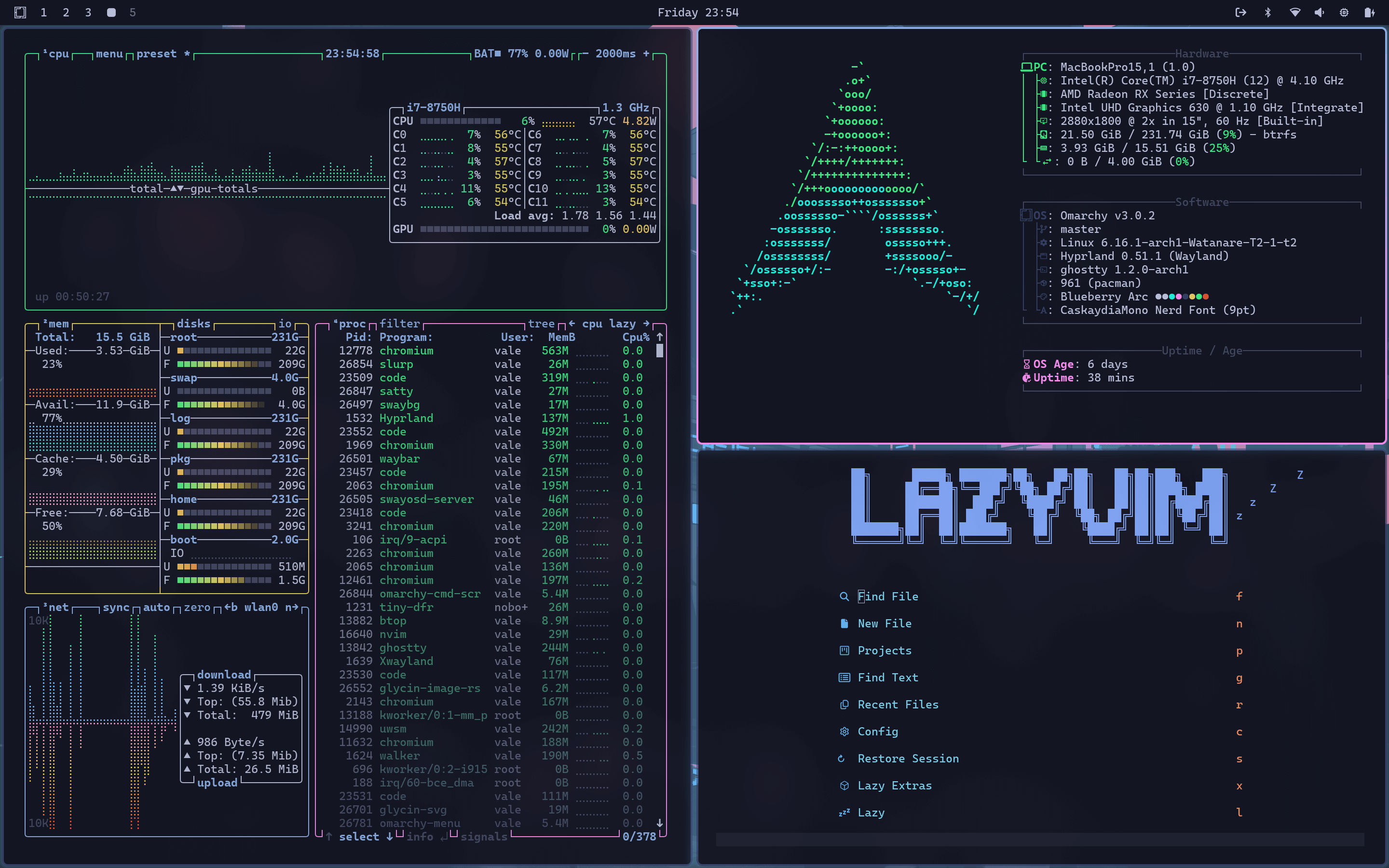
Why it stands out
- A luminous pink-to-blue active border with a soft blue window glow
- One balanced palette across the Omarchy shell, terminals, editors, btop, browser chrome, lock screen, and more
- Four matching wallpapers and Yaru Blue icons
- Native support for the Omarchy 4 theme system
- The original Bearded Theme Arc Blueberry experience in VS Code
Install
Open the Omarchy Menu with Super + Space, then choose Install > Style > Theme and paste:
https://github.com/vale-c/omarchy-arc-blueberryOr install it from a terminal:
omarchy theme install https://github.com/vale-c/omarchy-arc-blueberryThe theme is applied immediately. To return to it later, use Style > Theme or press Super + Ctrl + Shift + Space.
Already installed an older version? Update all third-party themes, then select Arc Blueberry again:
omarchy theme updateWhat gets themed
Arc Blueberry uses Omarchy's semantic colors.toml palette. Omarchy generates and reloads its supported integrations whenever the theme is selected, so they stay consistent without a directory full of duplicated config files.
| Surface | Included integrations |
|---|---|
| Omarchy shell | Top bar, menus, launcher, notifications, OSD, authentication prompts, image picker, and lock screen |
| Hyprland | Gradient borders, rounded corners, compact gaps, blur, fluid animations, and an active-window glow |
| Terminals | Ghostty, Alacritty, Kitty, Foot, and tmux |
| Editors | Neovim, Helix, Obsidian, VS Code, VSCodium, and Cursor |
| AI and CLI tools | Claude Code, Pi, OpenCode, Gum, and btop |
| Browsers | Chromium, Chrome, Edge, Brave, and Brave Origin |
| Desktop | GNOME light/dark preference, supported keyboard RGB, four wallpapers, and Yaru Blue icons |
VS Code, VSCodium, and Cursor intentionally use the original Bearded Theme Arc Blueberry extension. The other integrations are generated directly from this repository's palette by Omarchy 4.
Palette
| Role | Hex | Preview |
|---|---|---|
| Background | #111422 | |
| Selection | #313b62 | |
| Foreground | #bcc1dc | |
| Accent | #8eb0e6 | |
| Electric blue | #69c3ff | |
| Magenta | #f38cec | |
| Cyan | #22ecdb | |
| Green | #3cec85 | |
| Yellow | #eacd61 | |
| Red | #e35535 | |
| Active border | #f38cec to #8eb0e6 |
Customize
Installed themes live in ~/.config/omarchy/themes/. The two files that define Arc Blueberry are:
colors.toml, the shared palette used by Omarchy's generated integrationshyprland.lua, the gradient border, glow, gaps, rounding, blur, and motion layer
After making a change, select the theme again to regenerate and reload its integrations. Local edits can conflict with a later omarchy theme update, so keep a copy if you plan to maintain a personal variant.
If the glow is missing after an update
Updating a theme pulls its files but does not reapply them. Run:
omarchy theme update
omarchy theme set arc-blueberry
The second command loads hyprland.lua, which enables the blue shadow around the active window. No personal Hyprland override should be required.
Credits
The palette and VS Code integration are based on Bearded Theme Arc Blueberry by BeardedBear. The Omarchy integration, Hyprland treatment, and wallpapers are original.
Released under the MIT License.